How to Use Runable: The Complete 2026 Guide

💡 > Key takeaways
- To use Runable, type what you want built into the input bar in plain language. The agent asks clarifying questions, builds it in a live sandbox, and you refine the result by chatting.
- Runable has three interaction modes (Agent, Chat, and Plan) and ten output types. Websites, slides, images, video, reports, and spreadsheets are the six people use most.
- Plan Mode makes the agent research your request and write a structured build plan for your approval before it touches code. Use it for anything with auth, payments, a database, or multiple integrations.
- Skills are reusable workflows, connectors link the agent to 3,000+ apps, and memory stores your preferences after you state them once.
- Runable has a free tier, with Pro at $20/mo (most popular) and Max at $100/mo, as of July 2026.
| At a glance | |
|---|---|
| What it is | A general-purpose AI agent that turns plain-language prompts into finished work |
| What it makes | Websites, slides, images, videos, reports, spreadsheets, carousels, audio, canvas designs, and chat answers |
| Coding required | None. You describe the outcome; the agent handles code, tools, and deployment |
| Pricing (as of July 2026) | Free tier; Pro $20/mo (most popular); Max $100/mo |
| Best starting point | The official quickstart, or just type a task and hit send |
What Is Runable?
Runable AI, found at runable.com, is the agent platform behind ten output types: websites, slides, images, video, reports, spreadsheets, carousels, audio, canvas work, and chat analysis. Everything runs in a cloud sandbox with a built-in skill library and connectors to 3,000+ apps, so one plain-language prompt can pull data, build the artifact, and deploy it. A free tier lets you test it without a card; Pro at $20/mo (most popular) and Max at $100/mo raise the credit limits for regular and heavy use.
Runable is a general-purpose AI agent: you describe an outcome in plain language, and it executes the whole job, from research to build to deployment, inside its own sandbox. It is a different category from a chatbot, which answers questions but leaves the doing to you.
That distinction matters for how you use it. With a chat tool like ChatGPT ($20/mo for Plus, as of July 2026), you copy answers out and assemble the work yourself. With an agent, you hand over the task and review the finished artifact.
Runable competes with other general agents like Manus, whose paid plans reportedly start around $20/mo as of July 2026. If you are weighing options, we keep an honest breakdown in Runable vs ChatGPT, and a wider tool roundup in AI tools for small business. The rest of this guide is about getting real work out of Runable itself.
Your First Task: The Full Walkthrough
Your first task takes one sentence: sign in at runable.com, type what you want in the input bar, and hit send. The agent reads your prompt, figures out what is missing, and asks you before it starts.
Try something concrete, like:
💡 > "Build me a landing page for my coffee subscription service."
You do not need to specify how. The agent might come back with questions about your style, audience, page count, or integrations.
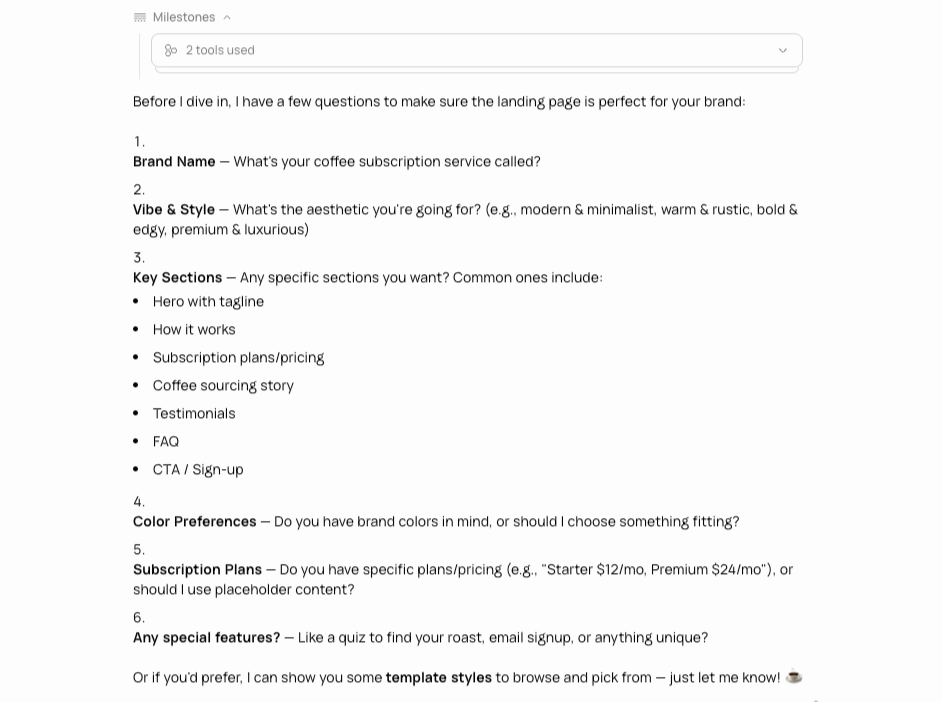
After you answer, it may offer templates so you can pick a direction instead of describing one.
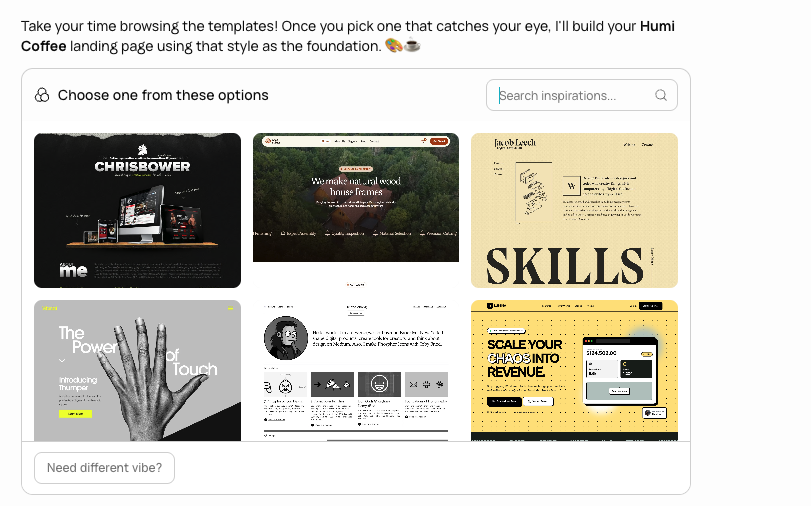
Then it builds. You watch the result stream in live in the side panel, which doubles as an AI canvas for visual work. From there you refine by talking: "make the hero darker," "add a pricing section," "swap the font."
That is the full loop: describe, answer, review, iterate. Everything else in this guide is about doing that loop faster and on bigger projects.
Getting to Know the Input Bar
The input bar is the whole control surface, so it is worth 30 seconds to learn. Everything you can configure lives in one row.
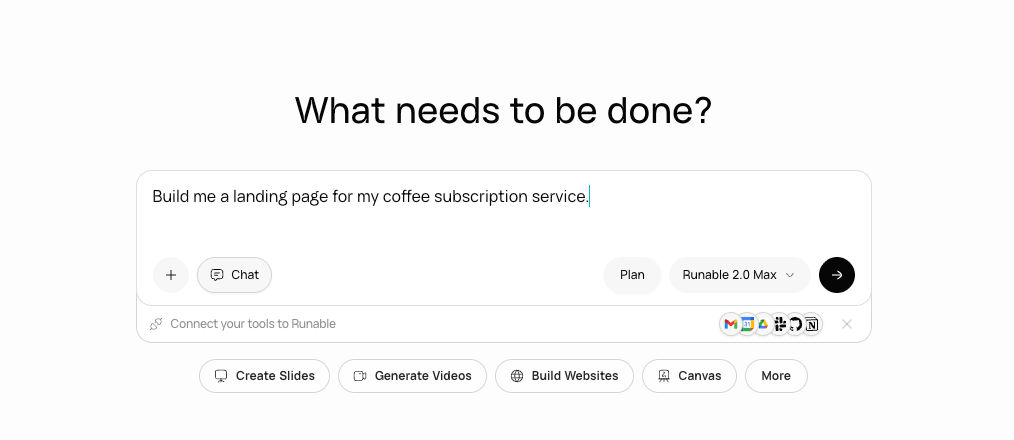
| Control | What it does |
|---|---|
| Text area | Where you describe the task in plain language |
| + button | Attach files for context (up to 10 files, 25 MB each) |
| Artifact selector | Pick an output type (website, slides, video...) or let the agent choose |
| Model selector | Lite, Pro, or Max model tiers; higher tiers cost more credits but reason better |
| Mode toggle | Switch between Agent, Chat, and Plan Mode |
| Skills / connectors | Manually invoke a skill with /skill-name or pull in a connected app |
Two useful safety nets sit alongside it. The rollback button restores any previous version, and branching lets you explore an alternative direction without losing your current work.
The 6 Modes People Use Most
Runable has ten output types, but six of them cover the vast majority of real usage: websites, slides, images, video, reports, and spreadsheets. Pick one explicitly in the input bar, or just describe the task and let the agent choose.
| Mode | What it makes | Example prompt |
|---|---|---|
| AI Websites | Full-stack sites and apps with databases, payments, and analytics, deployable to a custom domain | "Build a booking site for my salon with Stripe deposits" |
| AI Slides | Full presentations, editable and exportable to PDF or PPTX | "10-slide seed pitch deck for a fintech startup" |
| AI Images | Generation plus editing: background removal, upscaling, text edits, region edits | "Product shots of this bottle on a marble counter" |
| AI Videos | Video from text or images, with motion control and background removal | "15-second product teaser from these three photos" |
| AI Reports | Research documents with citations and charts | "Competitive analysis of meal-kit services in Brazil" |
| AI Spreadsheets | Formula-based sheets, with XLSX/CSV import and export | "Cash-flow model for a cafe doing $40k/month" |
The other four are Carousel (multi-slide social posts), Audio (text-to-speech, voice cloning, music, transcription), Canvas (freeform visual workspace), and Chat (text-only answers and document analysis). If slides are your main use case, we compared the field in best presentation tools for 2026.
One thing to know before you start: Agent Mode and Chat Mode are separate conversation types, so pick the one that fits before you send your first message. Use Chat when you only need answers or analysis, since it consumes fewer credits.
Use Plan Mode When the Stakes Are High
Plan Mode makes the agent research, question, and write a structured plan that you approve before any code gets written. Use it whenever a project has auth, payments, a database, or multiple integrations.
Say you are about to request a 5-page website with Stripe checkout, a database, and user authentication. That is a lot of moving parts, and you do not want the agent sprinting in the wrong direction. Click Plan before you send that message.
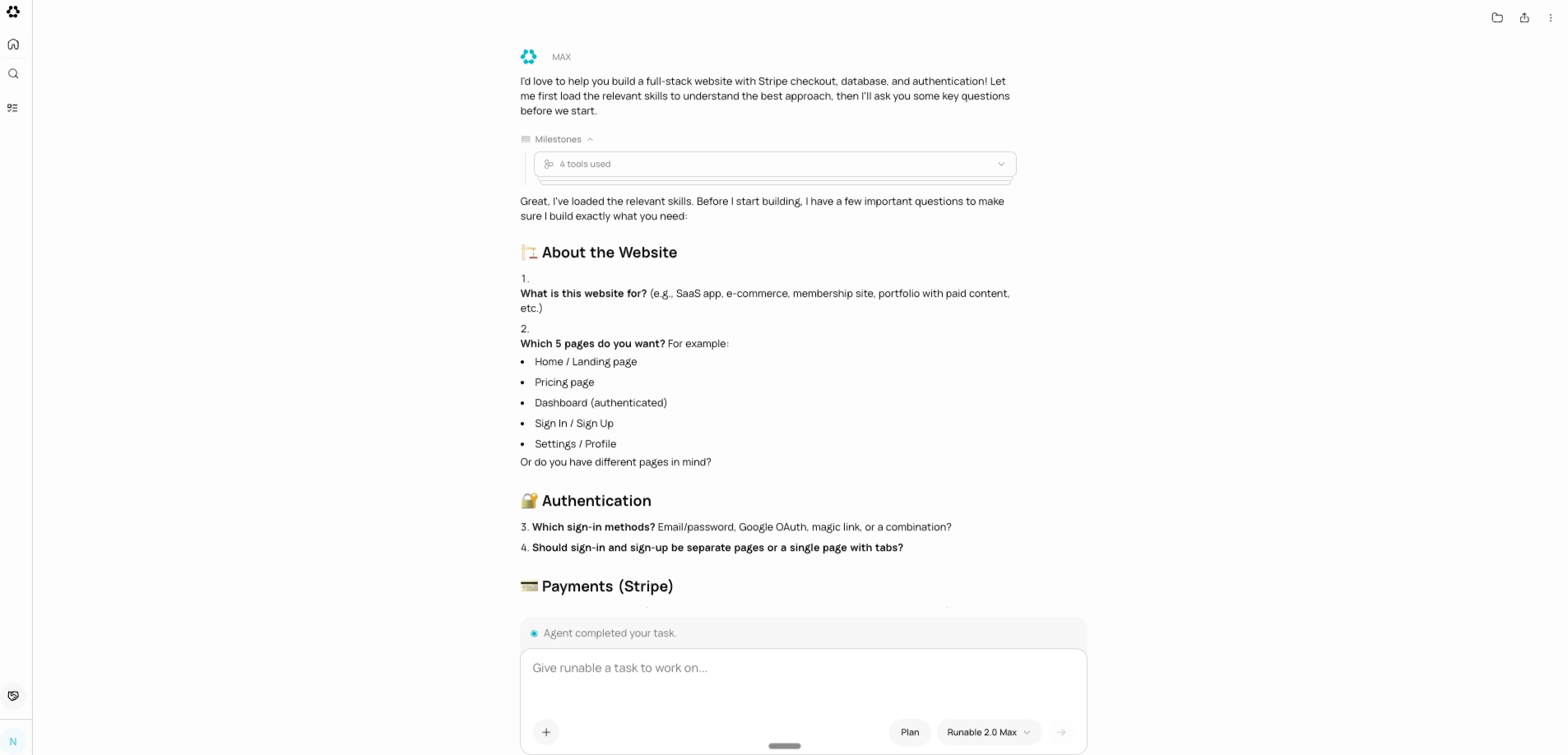
What happens next feels more like a strategy session than a build. The agent does its homework: it searches the web for relevant patterns, reads any files you uploaded, and checks its documentation. Then it comes back with questions, not code.
Good questions, too. Should users sign up with email or Google? Should payments be one-time or recurring? Do you need an admin dashboard?
Once you have hashed that out, it writes a plan: a structured breakdown of what it will build, in what order, using what tools. You read it, tweak it, and approve it. Only then does it start writing code.
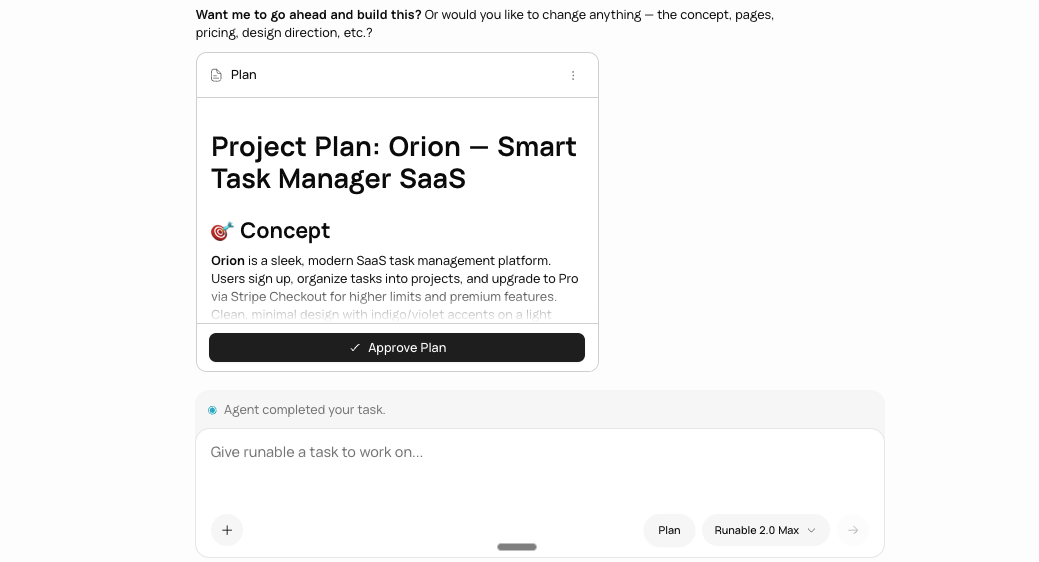
The rule of thumb: any project with more than one or two pieces that must work together earns Plan Mode. It saves you from the "that is not what I meant" moment three steps in. For simple one-off tasks, the default Agent Mode flow is faster.
Skills, Workflows, and Connectors Explained
Skills are reusable workflows that extend what the agent can do, and connectors link it to 3,000+ outside apps. Together they are how you turn one-off prompts into a repeatable system.
Skills
When you ask for something, the agent pulls up a skill: a packaged workflow with the right instructions, tools, and templates for that job. It picks automatically. Ask for a pitch deck and it runs the presentation skill; ask for a landing page with Stripe and it layers the website and payments skills together.
There are two kinds. Official skills come built into the Runable skill library, and you can toggle them on or off from your settings. Custom skills are workflows you create yourself.
Building a custom skill is the highest-leverage move for repeat users. If you run the same task weekly (client reports, content formats, audit checklists), just ask the agent to package it into a skill. It writes a SKILL.md file, saves it to your sandbox, and the skill is available immediately in every future conversation.
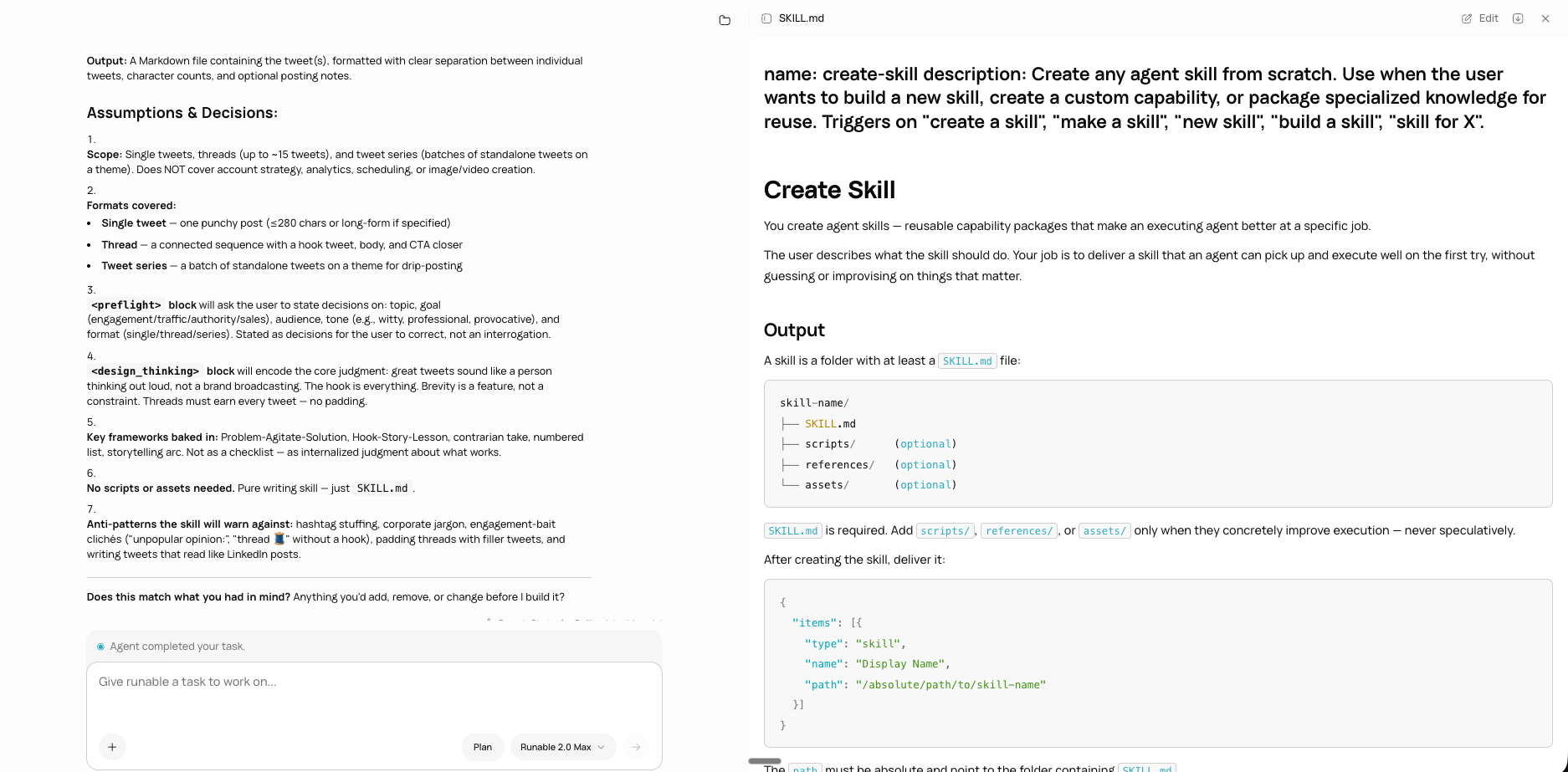
You can also invoke any skill explicitly by typing /skill-name in the input bar, or bring in a skill you built elsewhere by uploading it.
Connectors
Connectors give the agent live access to your other tools: Google Workspace, Slack, Notion, GitHub, Shopify, and thousands more. Connect an app once and the agent can read from it and act on it as part of a task, like "pull this month's Shopify orders into a spreadsheet and chart the trend."
Runable also meets you where you already work through RunClaw, its messaging integration. You can message the agent from Slack, Discord, Telegram, and more instead of opening the web app.
Memory: Tell It Once, It Remembers
Runable checks its memory at the start of every new chat, so anything you have told it before is already loaded. State a preference once and every future build starts from it.
Say this once: "My brand colors are #1a1a2e and #e94560, font is Inter, always dark mode." Every design from that point (websites, decks, carousels) starts from those defaults. No repeating yourself, no pasting style guides.
It works for anything you would otherwise re-explain: company name, tone of voice, tech stack, deployment setup. Preferences change? Tell it that too: "Switch to light mode from now on." Done. You can also set standing rules directly in Settings under Custom Instructions.
How Much Does Runable Cost?
Runable pricing at a glance (as of August 2026): a free tier at $0, Pro at $20 per month (the most popular plan), and Max at $100 per month for the highest limits. Annual billing works out to $240 per year for Pro and $1,200 per year for Max. Both paid plans run on the same credit system, so the price difference buys a larger monthly credit pool rather than different features.
Is Runable free? Yes. Runable has a free tier, so you can sign up and run real tasks without entering a card. When you need more, Pro at $20/mo (most popular) covers regular daily use, and Max at $100/mo gives heavy users the highest limits. Here is the lineup as of August 2026; check the pricing page for current credit allowances.
| Plan | Price | Credits | Best for |
|---|---|---|---|
| Free | $0 | Starter allowance | Trying the agent and small one-off tasks |
| Pro (most popular) | $20/mo ($240/yr) | 1,500 daily, 25,000 monthly | Regular solo use across most modes |
| Max | $100/mo ($1,200/yr) | 1,500 daily, 150,000 monthly | Heavy media generation and daily production work |
Every AI action consumes credits, and cost scales with intensity. Higher model tiers (Max over Pro over Lite), higher resolution, and longer duration all cost more; video is billed per second, and videos with AI-generated audio cost roughly 2x versus muted ones.
Two credit rules worth knowing upfront: unused monthly credits do not roll over, and credits cannot transfer between accounts. If you are budget-sensitive, do drafting on the Lite model and save Max for final renders.
Tips for Getting Better Results
The single biggest lever is giving the agent context upfront, because every clarifying round trip you skip saves time and credits. These habits compound fast.
- Front-load context. Attach brand assets, examples, and data files with the + button instead of describing them. Ten files at 25 MB each is a lot of context.
- Use Chat Mode for thinking, Agent Mode for building. Brainstorming in Agent Mode burns credits on execution you do not need.
- Approve a plan before big builds. Plan Mode feels slower but is cheaper than three wrong builds.
- Branch instead of overwriting. Want to try a bolder design? Branch the conversation, compare, keep the winner. Rollback covers you either way.
- Turn repeat tasks into skills. The second time you explain a process is the time to say "package this into a skill."
- Seed memory early. Spend your first five minutes telling the agent your brand, tone, and stack. Every task afterward starts warmer.
- Match the model to the job. Lite for drafts and simple edits, Pro for standard builds, Max for complex reasoning and final-quality media.
Where Runable Falls Short
Runable is not magic, and knowing its limits will save you frustration. These are the honest rough edges as of July 2026.
- Complex builds still need review. The agent gets multi-part projects impressively far, but you should test auth flows, payments, and edge cases before going live, same as you would with a human contractor's first draft.
- Agent and Chat are separate conversation types. Pick the mode that fits when you start a thread; Chat is for answers and analysis, Agent is for building.
- Heavy media eats credits fast. 4K video, long audio, and AI-generated soundtracks are the expensive end of the credit model, and unused credits do not roll over.
- Iteration is conversational, not pixel-level. For fine-grained manual control of every element, a traditional design tool is still faster for that final 5%.
- Free-tier sites carry a "Made with Runable" badge. Removing it requires a paid plan.
None of these are unusual for the agent category, and the 2.0 release closed several older gaps. But you should go in with accurate expectations.
Is Runable an AI Website Builder?
Runable works as a full AI website builder: describe the site you want in plain language and the agent designs, codes, and deploys it, including multi-page layouts, forms, databases, authentication, and Stripe payments. Unlike template-based site builders, there is no drag-and-drop editor to learn; you refine the live site by talking to the agent.
A typical build starts with one sentence, like "build a landing page for my coffee subscription service." The agent asks about your audience, style, and integrations, offers templates if you want a starting point, then streams the site into the side panel. From there you iterate conversationally: "make the hero darker," "add a pricing section," "swap the font." Rollback and branching let you compare directions without losing work.
For bigger sites with auth, payments, or a database, run the request through Plan Mode so you approve the structure before the agent writes code. Websites built on the free tier carry a "Made with Runable" badge; removing it requires a paid plan, and Pro at $20/mo (the most popular plan) covers most regular site work. Seed memory with your brand colors and fonts once, and every future site starts from those defaults.
Is There a Runable AI App?
Runable is a web app: you use it in any browser at runable.com, with nothing to download or install. Sign in, type a task into the input bar, and the agent does all the heavy lifting in its own cloud sandbox, so your device's specs never matter.
Runable's web interface works on phone and tablet browsers the same way it does on desktop. You can kick off a build from your phone, close the tab, and come back later to review the finished result, since tasks keep running in the sandbox after you leave.
RunClaw, Runable's messaging integration, is the closest thing to a native app experience. Connect it once and you can send tasks to the agent from Slack, Discord, Telegram, and other chat apps you already have installed, then get results back in the same thread. Access works the same at every entry point: the free tier applies everywhere, and Pro at $20/mo (the most popular plan) or Max at $100/mo unlocks higher credit limits whether you work from the browser or from chat.
Frequently Asked Questions
What is the Runable agent and how does it work?
The Runable agent is a general-purpose AI agent that turns natural-language instructions into finished work. You type what you need (a website, video, deck, or report), and the agent asks clarifying questions, picks the right skills, builds the output in a sandbox, and lets you refine it by chatting. No setup or configuration is required.
Do I need to know how to code to use Runable?
No. Runable is built for natural-language instructions, so you describe the outcome and the agent handles the code, tools, deployment, and file handling on its own. Beginners can start with a simple prompt, and Plan Mode adds a review step for bigger projects so you approve the approach before anything is built.
What is Plan Mode in Runable and when should I use it?
Plan Mode makes the agent research your request, ask clarifying questions, and write a structured plan that you approve before it writes any code. Use it whenever a project has multiple moving parts, such as multi-page websites, payment integrations, databases, or workflow automations. For simple one-off tasks, the default Agent Mode flow is faster.
How much does Runable cost?
Runable has a free tier, so you can try the agent without paying. Pro costs $20 per month and is the most popular plan, while Max costs $100 per month for heavier usage. Pricing is current as of July 2026; check the pricing page for the latest credit allowances on each plan.
Is Runable free?
Yes. Runable is free to start: sign up and run real tasks on the free tier without a card. If you outgrow the free limits, Pro costs $20 per month (the most popular plan) and Max costs $100 per month for heavy users who want the highest limits and priority execution.
Can Runable remember my preferences between chats?
Yes. Runable checks its memory at the start of every new chat. Tell it your brand colors, fonts, tone of voice, or tech stack once, and every future website, deck, or design starts from those defaults. If your preferences change, say so in plain language and the agent updates its memory.
Start Using Runable: Run Your First Task Free
The fastest way to learn how to use Runable is to give it a real task from your actual to-do list, right now, on the free tier. Type it into the input bar, answer the agent's questions, and watch it build.
Describe, answer, review, iterate. That loop is the whole method, and everything else (Plan Mode, skills, connectors, memory) just makes it sharper. The quickstart guide has you running your first task in under five minutes.
META_TITLE: How to Use Runable: The Complete 2026 Beginner Guide
META_DESCRIPTION: Learn how to use Runable in 2026: run your first task, master the 6 most-used modes, Plan Mode, skills, connectors, and memory, plus pricing and honest limits.
SLUG: runable-2.0-agent
CATEGORY: Product
TAGS: how to use runable, runable guide, runable tutorial, ai agent, plan mode

