Runable vs Gamma (2026): Which Should You Use?
💡 > Key takeaways
- Pick Runable if you want an AI agent that handles content and design decisions end to end across slides, websites, videos, and more. Pick Gamma if presentations are your main deliverable and you want to direct every theme, layout, and image choice yourself.
- Gamma works like a co-pilot: it drafts content, suggests layouts, and finds images, but you still make every design call. Runable works like a creative director that makes those calls for you.
- Runable creates in ten formats from one task prompt, with four entry points for slides: prompt, outline, link, or PDF upload.
- Pricing as of July 2026: Runable has a free tier, Pro at $20/mo (most popular), and Max at $100/mo. Gamma has a free plan with 400 one-time credits, Plus at $10/mo, and Pro at $20/mo.
- Gamma genuinely wins for control-lovers, teams that need brand kits and analytics, and anyone who enjoys the design process itself.
| Runable | Gamma | |
|---|---|---|
| What it is | General AI agent, ten creation formats | AI presentation and website builder |
| Best for | Outcome-focused users who delegate design | Control-focused users who refine every slide |
| How it works | You give it a task, it decides content and design | AI drafts, you direct themes, layouts, images |
| Formats | Slides, websites, videos, podcasts, docs, carousels, images, reports, canvas, chat | Presentations, documents, websites, social posts |
| Entry points for slides | Prompt, outline, link, PDF upload | Prompt, outline, paste text, import file |
| Design engine | Nano Banana Pro for imagery, palettes, hierarchy | Theme system with manual customization |
| Free plan | Yes, recurring free tier | Yes, 400 one-time credits |
| Paid plans (Jul 2026) | Pro $20/mo, Max $100/mo | Plus $10/mo, Pro $20/mo, Ultra $90/mo (reported) |
The verdict: Runable for outcomes, Gamma for control
If you want to describe what you need and get a finished, designed result, use Runable. If you want AI to speed up a process you still enjoy steering slide by slide, use Gamma.

The two products answer different questions. Gamma asks how AI can help you create better and faster, so it handles tedious work like content drafting and layout suggestions while you refine. Runable asks what happens if AI acts as your creative head, so it makes design decisions itself and you focus on strategy and substance.
Neither answer is wrong. The distinction mirrors the broader split we covered in AI tools versus AI agents: assistants accelerate your decisions, agents make decisions for you.
What is Gamma?
Gamma is an AI-assisted builder for presentations, documents, and simple websites, and it positioned itself early as the presentation tool for the AI era. The AI generates content, suggests layouts, and pulls images, then you direct every landing.
Think of it like air traffic control. AI generates the flights, meaning content, layouts, and image options, but you coordinate every element until it lands on your slide. Which theme, which layout, what stays and what goes: those routing decisions are yours.
That model has real strengths. Gamma's card-based editor is pleasant, its themes look modern out of the box, and paid tiers add custom branding, fonts, analytics, custom domains, and API access.
The limitation is that the mental load stays with you. Gamma makes you choose faster, but choosing faster is not the same as having good choices made for you.
What is Runable?
Runable is a general-purpose AI agent: you give it a task in plain language and it executes end to end. Presentations are one of ten creation formats, alongside websites, videos, podcasts, documents, carousels, images, reports, canvas, and chat, all part of the Runable 2.0 platform.
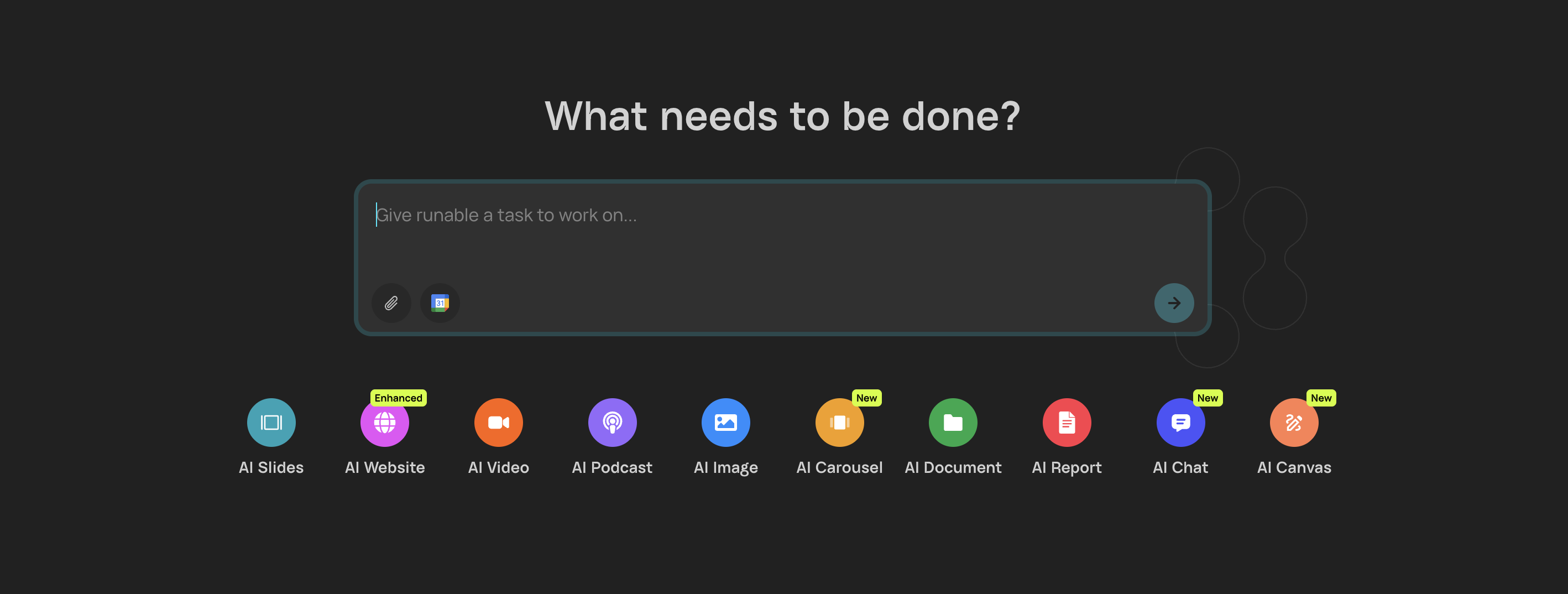
The prompt box does not ask what presentation you want. It says "Give runable a task to work on," and that wording is the whole philosophy: you describe the outcome, and the AI figures out how to make it exist, from structure to visuals.
For slides specifically, Runable gives you four entry points:
- Prompt. Start from scratch with a task or idea and the AI builds everything from your description.
- Outline. Paste a structure you already have and the AI turns it into designed slides with supporting visuals.
- Link. Drop a URL to an article or webpage and Runable extracts the key points and builds a deck around them.
- PDF. Upload a report or existing deck and the AI distills it and reimagines it as slides.
Whichever path you take, you can toggle on Nano Banana Pro, Runable's design intelligence layer. It picks imagery, color palettes, cropping, and visual hierarchy to match your content's tone, the kind of choices you would otherwise hand to a standalone AI image generator, so output quality does not depend on your design skills. You also choose your slide count and can start from 1,000+ inspirations organized by use case, like pitch decks, reports, and educational content.
Feature comparison: Runable vs Gamma
On features, the split is clean: Gamma goes deeper on presentation polish and team controls, while Runable goes wider on formats and further on autonomy. Here is how they line up as of July 2026.
| Feature | Runable | Gamma |
|---|---|---|
| Output formats | 10 modes: slides, sites, video, podcasts, docs, and more | Presentations, docs, websites, social posts |
| AI autonomy | Agent makes content and design decisions | AI suggests, user decides |
| Design decisions | Nano Banana Pro handles imagery, palettes, hierarchy | Manual theme, layout, and image selection |
| Templates | 1,000+ inspirations by use case | Theme gallery with customization |
| Input options | Prompt, outline, link, PDF | Prompt, outline, paste, import |
| Manual fine-tuning | Lighter, outcome-first editing | Deep card-by-card editing |
| Custom branding | Basic | Custom fonts and brand kits on Pro |
| Analytics | Not a focus | Detailed engagement analytics on Pro |
| API access | Agent handles tasks directly | API on Pro and above |
| Cards per generation | You set the slide count | 10 to 75 cards by tier (reported) |
Two honest notes on this table. Gamma's analytics, custom domains, and brand kits are real advantages for teams that publish decks and pages under their own brand, and Runable does not try to match that stack. Runable's advantage is that a single subscription covers work you would otherwise split across Gamma plus a design tool like Canva plus a video tool.
Pricing: Runable vs Gamma (as of July 2026)
Runable and Gamma both run freemium models with credit-based paid tiers, and at the popular mid-tier they cost the same $20/mo. The difference is what that $20 buys: broader formats and autonomy on Runable, deeper presentation features on Gamma.
Runable pricing (as of July 2026): Free tier; Pro $20/mo (most popular), Max $100/mo. Pro includes 1,500 daily credits and 25,000 monthly credits, while Max raises the monthly pool to 150,000 for heavy use. Full details are on the pricing page.
Gamma pricing (as of July 2026): Free plan with 400 one-time credits that do not refresh; Plus at $10/mo with 1,000 monthly credits and watermark removal; Pro at $20/mo with 4,000 monthly credits, custom branding, analytics, and API access. These are reported monthly prices, and annual billing is cheaper on both paid tiers. An Ultra tier at a reported $90/mo adds 20,000 credits, and annual-only Team and Business plans are reported at $20 and $40 per seat per month.
| Plan level | Runable | Gamma |
|---|---|---|
| Free | Recurring free tier | 400 one-time credits, watermark |
| Entry paid | Pro $20/mo, 25,000 monthly credits | Plus $10/mo, 1,000 monthly credits |
| Power tier | Max $100/mo, 150,000 monthly credits | Pro $20/mo, 4,000 credits; Ultra ~$90/mo reported |
Read the fine print on both sides. Gamma's free credits never refresh, so the free plan is a trial rather than a durable free tier, but its $10 Plus plan is a cheaper entry point than Runable Pro if slides are all you need. Runable's free tier recurs, but heavy multi-format use will push you toward Pro sooner than a slides-only workload would.
Where Gamma wins
Gamma is the better choice for people who want their fingerprints on every element, and that is a genuine win, not a consolation prize. If tweaking layouts and exploring themes gives you energy, Gamma's co-pilot model fits how you work.
Specifically, Gamma wins when:
- You love the design process. Choosing themes, adjusting layouts, and deciding which images work is the point for you, not overhead.
- You need pixel-level control before a high-stakes meeting. Card-by-card editing means the final deck is exactly what you approved, element by element.
- Your team publishes under a brand. Custom fonts, brand kits, custom domains, and engagement analytics on Gamma Pro are built for repeatable branded output.
- You want the cheapest paid entry for slides. Plus at $10/mo undercuts Runable Pro if presentations are your only deliverable.
- You need an API for programmatic deck generation. Gamma Pro exposes one; Runable's model is giving the agent tasks instead.
Where Runable wins
Runable wins when the deck is a means to an end and you would rather spend the next 30 minutes on strategy than on font choices. It also wins the moment your work extends past presentations.
Runable is the better pick when:
- You want output without design labor. The agent makes layout, imagery, and palette decisions with design intelligence, so quality does not depend on your taste or time.
- You create in multiple formats. One task prompt can produce a deck today, a website tomorrow, and a video script next week, the multi-format shift we mapped in our 2026 content AI guide and the same breadth that separates it from single-format rivals in our ChatGPT comparison.
- You start from existing material. Link and PDF entry points turn articles and reports into designed decks without copy-paste restructuring.
- You delegate whole tasks, not steps. Research, drafting, and design happen in one run instead of a chain of prompts you supervise.
The honest cons: Runable gives you less granular per-element control than Gamma's editor, it does not offer Gamma's analytics or brand-kit stack, and credits meter heavy usage on every plan. If you want a deep look at how it compares against another agent rather than a tool, see Runable vs Manus.
Which should you choose?
Choose based on how much creative control you actually want to keep, not on feature counts. Both tools produce high-quality presentations; they just put the steering wheel in different hands.
- Solo founder shipping a pitch deck this week: Runable. Describe the company, set the slide count, review the result.
- Designer or design-minded marketer: Gamma. The control you want is the product.
- Ops or growth person producing decks, docs, and social content: Runable. One agent covers the stack.
- Team standardizing branded decks with analytics: Gamma Pro. Brand kits and engagement data are built in.
- Someone who mostly repurposes reports and articles into slides: Runable. PDF and link inputs were built for exactly this.
If you are still unsure, run the same real task through both free plans on a deck you actually need.
Related Reading
FAQ
Is Runable better than Gamma for presentations?
Runable is better if you want AI to handle design decisions end to end: it picks layouts, imagery, and color palettes, and it creates across ten formats, not just slides. Gamma is better if you enjoy customizing themes and layouts yourself and presentations are your main output. The right choice depends on how much creative control you want to keep.
What is the difference between Gamma and Runable?
Gamma is an AI-assisted presentation tool: the AI drafts content and suggests layouts, and you direct every decision. Runable is a general AI agent that takes a task and makes the content and design decisions for you, producing slides, websites, videos, podcasts, and documents from a single prompt.
Can Runable create a presentation from a PDF or link?
Yes. Runable offers four entry points for slides: a written prompt, a pasted outline, a URL, or an uploaded PDF. It extracts the key points from your document or article and builds designed slides around them, with Nano Banana Pro optionally handling imagery, palettes, and other visual choices.
How much do Runable and Gamma cost?
As of July 2026, Runable has a free tier, Pro at $20/mo (most popular), and Max at $100/mo. Gamma has a free plan with 400 one-time credits, Plus at $10/mo, Pro at $20/mo, and a reported $90/mo Ultra tier. At the $20 mid-tier, Runable buys ten creation formats while Gamma buys deeper presentation features.
Who should use Gamma instead of Runable?
Gamma suits people who love the design process itself: choosing themes, tweaking layouts, and deciding which images work. If presentations are your main deliverable and you want AI as a fast co-pilot rather than an autonomous decision-maker, Gamma's control-first approach will feel liberating rather than limiting.
Try the Gamma alternative that works like an agent
If this Runable vs Gamma comparison landed you on the outcome side, the fastest way to confirm it is one real task. Runable's free tier lets you hand over a deck, a report, or a whole campaign and judge the finished result, not a demo.
Start with the prompt box, an outline, a link, or a PDF, and let the agent make the design calls. Gamma makes you great at presentations. Runable aims to make you great at creation, period. Get started free or follow the quickstart to run your first task in minutes.
META_TITLE: Runable vs Gamma (2026): Verdict, Pricing & Features
META_DESCRIPTION: Runable vs Gamma compared for 2026: the verdict, pricing, features, and honest trade-offs. When Gamma's control wins and when Runable's AI agent fits better.
SLUG: runable-vs-gamma
CATEGORY: Comparisons
TAGS: runable vs gamma, gamma alternative, ai presentation tools, ai agents, comparison

