AI for Accountants in 2026: A 30-Minute Month-End Close Workflow

Key Takeaways
- AI can compress the hands-on month-end close into one focused review session. For clean, smaller sets of books, AI prepares reconciliation matches, accrual drafts, variance analysis and reports in the background, leaving the accountant with roughly 30 minutes to review exceptions and approve the results.
- Automate preparation, not accounting judgment. AI can propose transaction matches, draft accruals, flag material variances and prepare reports; an accountant should verify the results.
- Keep your ledger as the system of record. QuickBooks, Xero or NetSuite should hold the approved entries, balances and audit trail.
- Runable can coordinate the preparation layer. It can analyze accounting exports, investigate transactions, surface unsupported items and draft summaries for accountant review.
- Pilot the workflow before rolling it out. Start with one low-risk entity and sanitized data, then measure the time saved and the exceptions requiring correction.
The 30-minute close at a glance
This is an illustrative workflow for clean, small-business books. Your review times will depend on transaction volume, how many exceptions come up and how tidy the source data is.
| Close task | What AI prepares | What you review | Illustrative review time |
|---|---|---|---|
| Bank and credit card reconciliation | Proposes transaction matches and lists exceptions | Unmatched and duplicate items | About 5 min |
| Accruals and prepaid schedules | Drafts entries from prior months | Amounts and support | About 5 min |
| Flux (variance) analysis | Variance table with draft explanations | Explanations that need judgment | About 10 min |
| Management report and client summary | Report pack and draft email | Numbers and tone | About 5 min |
| Close checklist and sign-offs | Checklist tracks completed steps | Blocked items, final sign-off | About 5 min |
Can AI really close month-end books in 30 minutes?
Yes, but the 30 minutes refers to focused review time, not the full elapsed close. For clean, smaller sets of books, AI can prepare reconciliation matches, accrual drafts and reports in the background, leaving the accountant with roughly 30 minutes of review and approval.
An AI-assisted month-end close uses agents to prepare reconciliations, draft accruals and generate variance reports while the accountant reviews and approves. That split matters because the review layer is what keeps the close defensible to auditors and clients. Keep a human approval step before any journal entry posts, and be wary of any vendor promising a fully hands-off close.
The reason this works at all is that a lot of close work is mechanical. A 2022 FloQast and University of Georgia survey of 204 accounting professionals found that 99% reported some level of burnout. Pulling statements, matching transactions and copying numbers into reports are the kind of repetitive tasks language-model agents handle well, which makes them a sensible place to start. Judgment calls, like whether an accrual is reasonable or a variance needs a disclosure, stay with you.
Why does month-end close take so long without AI?
Month-end close is slow because it is a chain of small manual handoffs, and each one adds wait time and rework. Data sits in the bank portal, the payroll system, the expense tool and the general ledger, and a person has to move it between them.
The usual bottlenecks look like this:
- Waiting on data. Statements arrive on different days, receipts trickle in, and one missing invoice can stall a whole reconciliation.
- Manual matching. Tick-and-tie work across bank feeds, cards and the ledger eats hours and is a common source of errors.
- Rewriting the same explanations. Flux commentary often gets drafted from scratch each month even though many variances have recurring causes.
- Checklist chaos. Tracking the close in a spreadsheet makes it hard to see what is done, what is blocked and who signed off.
An agent that chases missing documents, matches transactions, drafts commentary from last month's language and updates the checklist removes handoffs, not just typing.
The 30-minute AI close: step by step
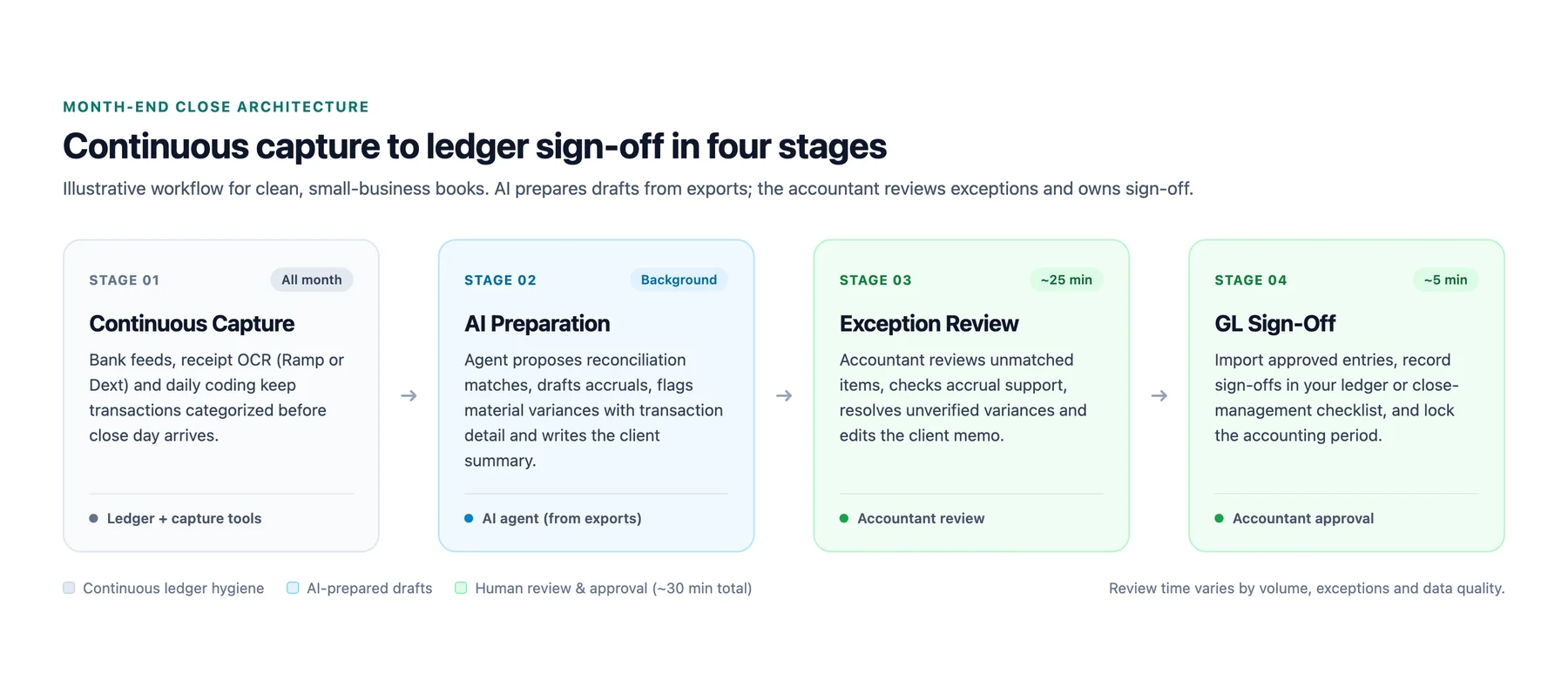
The idea is to push everything automatable into agent runs before close day, then batch your review into one sitting. Here is the sequence, assuming a small business or client entity on QuickBooks or Xero.
Step 1: Automate transaction capture all month
Capture should be finished before close starts. Connect bank feeds, use receipt capture (Ramp, Dext or your ledger's built-in tools), and use AI-assisted categorization to code transactions daily. Coding continuously instead of once a month means errors show up within days instead of at close.
Step 2: Run AI reconciliation matching (about 5 minutes of review)
Start review from an exception report, not a transaction list. The agent matches bank and card activity against the ledger, proposes likely matches and surfaces unmatched or duplicate items. On clean books you review a short exception list instead of scrolling every line.
Step 3: Draft accruals and prepaid schedules (about 5 minutes of review)
Accrual drafting is largely pattern recognition. An agent reads last month's entries, checks current invoices and contracts, rolls prepaid schedules forward and drafts the journal entries with supporting notes. You review or adjust the drafts, then import the approved entries into your ledger.
Step 4: Generate flux analysis with written explanations (about 10 minutes of review)
Flux analysis is likely the biggest single time-saver. Give an agent this month's trial balance, last month's, and the same month last year, and it can produce a variance table with plain-English explanations for every line that moved past your threshold. For example: "Compare the October and November P&L for [client], flag variances exceeding both 10% and $2,000, explain each using the transaction detail, and format it as a client memo." Your time goes to editing the few explanations that need real judgment.
Step 5: Produce reports and the client summary (about 5 minutes of review)
Reporting should be generation, not assembly. The agent builds the management report pack (P&L, balance sheet, cash flow summary, KPIs) plus a short narrative. For client accounting firms, the same run can draft the monthly client email. Review, tweak, send.
Step 6: Close the checklist (about 5 minutes)
Track completed steps and approvals in your ledger or close-management checklist. You scan the checklist, confirm nothing is blocked and mark the period closed in your ledger.
What does an AI-assisted accounting stack need?
A close-ready stack needs four things, and only one of them is an AI agent. Disclosure: Runable is our product, so weigh the recommendation accordingly.
- A system of record. Keep QuickBooks, Xero or your existing ledger. Runable works alongside it rather than replacing it.
- Clean source data. Use your ledger's receipt-capture features or an expense tool you already have.
- An orchestration layer. Use Runable's Finance bundle and workflows to prepare exception reports, variance analysis and client summaries from ledger exports.
- Human approval. Review entries and sign off inside the ledger or close-management system. Runable does not post entries for you in this workflow.
How Runable fits
QuickBooks, Xero and NetSuite already handle core bookkeeping, reconciliation and standard financial reports. In the demonstration below, Runable works on top of that ledger data rather than replacing it. It combines five fictional files, applies a written close policy, traces material variances to transaction rows, detects a payroll-to-ledger mismatch, flags unsupported items and produces client questions, a variance memo, sign-off checklist and draft email. It does not post entries or change the ledger.
Runable is a general-purpose AI agent that runs multi-step workflows from a single prompt. Its pricing page lists 100+ curated workflows, and it also includes an official Finance bundle with eight accounting-focused skills. These skills can be combined inside broader workflows for tasks such as close preparation, financial analysis and reporting. If you want to see how AI workflow automation replaces manual handoffs more broadly, that guide maps onto the close sequence above.
Below is a selected variance table from the fictional Northstar Advisory exports. Under the close policy used in the full demonstration, only changes exceeding both 10% and $2,000 require follow-up.
| Account | Nov 2026 | Oct 2026 | $ change | % change |
|---|---|---|---|---|
| 4000 Advisory Retainers | $72,500 | $64,000 | +$8,500 | +13.3% |
| 5000 Direct Contractors | $15,800 | $11,200 | +$4,600 | +41.1% |
| 6100 Software and Subscriptions | $6,350 | $3,450 | +$2,900 | +84.1% |
| 6200 Marketing and Events | $7,850 | $4,200 | +$3,650 | +86.9% |
| 6400 Professional Fees | $5,400 | $1,900 | +$3,500 | +184.2% |
| 6500 Travel and Client Meals | $1,620 | $1,450 | +$170 | +11.7% |
Demo: a full close review pack from five files
The variance analysis above covers one part of the close. This Runable session brings the full review together. Runable received five fictional files: October and November P&L exports, November transaction detail, a November payroll export and a written close policy. One prompt asked for an exception report, a variance memo, client questions, a close sign-off checklist and a draft client email.
Runable preparing a month-end close review pack from fictional ledger and payroll exports. No live accounting account was connected. This 57-second screen recording has processing time removed; accountant approval remains required before posting entries or sharing results.
The close policy flags only P&L changes above both 10% and $2,000. Travel and Client Meals rose 11.7%, but only by $170, so it was not flagged. Here is what the pack surfaced:
- Five material variances. Retainers, contractors, software, marketing and professional fees each passed both thresholds. Each explanation cites the November transaction rows, and the pack notes that October detail is still needed to confirm the cause.
- A payroll mismatch. The payroll export totals $32,650, while ledger account 6000 shows $31,800. The $850 gap exceeds the policy's $100 tolerance. The payroll file notes a one-time payment, but the pack treats the cause as unverified.
- An unsupported item. The $3,500 wire (Ref #88412) has no substantive memo, so the pack requests the recipient, purpose, invoice and approval instead of guessing.
- Drafts held for review. The client questions, draft email and checklist were produced as drafts. No entries were posted and no email was sent; final sign-off stays pending until an accountant clears the open items.
Works with your existing stack
The workflow is built to sit on top of what you already use. QuickBooks and Xero stay the ledger. Runable has a QuickBooks connector for invoices, expenses and customers, so that data can come in directly instead of through manual exports. Xero works through exports. Ramp or Dext are optional capture tools if your receipts are still manual. Larger teams that need formal sign-off trails may also look at close-management platforms such as FloQast or Numeric.
How do you choose the right AI stack for your close?
Count layers, not features: one ledger, one capture tool and one agent is enough for most small firms. A solo accountant or small firm might pair QuickBooks or Xero with Dext or Ramp for capture and a general-purpose AI agent for reconciliation review, flux memos and client reporting. An in-house team that needs formal sign-off trails may add FloQast or Numeric for close management.
Three buying rules keep you out of trouble:
- Never use a tool that posts entries without approval. Review gates are a feature, not friction.
- Pilot on one entity for one full close before rolling out. Every AI tool looks good in a demo and shows its gaps on your messiest client.
- Measure your own hours. Time your current close once, then time the AI-assisted version. If you are not saving meaningful hands-on time by month two, change the setup or the tool.
If you are earlier in the journey and wondering what to automate first, that framework applies to the close sequence above.
Related Reading
- AI Automation for Small Business: What to Automate First
- AI Workflow Automation: 7 No-Code Workflows for 2026
- Best AI Agents for Small Business in 2026 (By Category)
- AI Tools for Small Business: 10 Best in 2026 (Tested)
- Best AI Virtual Assistant in 2026: 9 Tools Tested
- How to Build, Market and Run Your Business with Runable
FAQ
What is the best AI for accountants closing month-end books?
It depends on your setup. You need a ledger (QuickBooks or Xero), an optional capture tool and an agent to prepare reconciliation exceptions, flux memos and reports. Teams that need formal sign-off trails may also want a dedicated close-management tool.
Can AI fully automate the month-end close with no human review?
It should not. AI can handle matching, drafting and report generation, but journal entries and period sign-off need human approval to stay defensible to auditors and clients. A realistic goal is a close where AI prepares most of the mechanical work and you spend a focused review session on exceptions and judgment calls.
Is it safe to give AI tools access to financial data?
It may be appropriate if you check a few things first:
- Client authorization and your engagement terms allow third-party processing
- The vendor's data retention and model-training policies are acceptable
- The tool gets least-privilege, read-only access (exports rather than live ledger credentials) where possible
- Your pilot uses anonymized or fictional test data
- A person approves every journal entry and any external report
SOC 2 compliance is a useful signal, but it does not on its own mean uploading client data is appropriate.
How do small accounting firms use AI during close without retraining staff?
Most start with one workflow, usually flux analysis or client reporting, because the output is easy to judge. Staff keep their ledger and checklist habits while an agent drafts the time-consuming outputs. Once reviewers trust the drafts, firms can expand to reconciliation exceptions and accrual preparation.
How much does AI for accounting cost in 2026?
It varies widely. Your ledger, a capture tool and an AI agent each have their own pricing, and many close-management platforms use custom quotes. Runable's Pro plan is $20/month as of November 2026. Check each vendor's current pricing page before you buy, since promotions and per-client firm plans change the total.
Try it on one entity before you roll it out
Pick one low-risk entity, use a sanitized export, and run a single close with a prompt like "reconcile this bank export against the ledger, flag exceptions, draft the flux memo and write the client summary." Time your review, compare it to your current process, and only then decide whether to expand.