AI for HR in 2026: Source Candidates, Humans Decide

Key Takeaways
- Use AI for candidate research, verification, outreach drafts, and scheduling; keep every advancement, rejection, and hiring decision human.
- The step-by-step Runable demonstration below shows the complete workflow: sourcing, evidence review, a decision board, outreach drafts, and follow-up emails.
- Runable co-founder Umesh Kumar uses this workflow internally, while Umesh and the hiring team decide whom to contact, interview, advance, and hire.
- Automated screening and rejection can create legal and quality risks. Treat AI as an evidence layer, not the final decision-maker.
Step by step: the Runable sourcing demonstration
- Enter the fictional role, location, must-have criteria, and optional criteria.
- Run the sourcing workflow and review 10 unranked public-profile leads with source evidence.
- Ask Runable to turn the batch into an interactive review board.
- Review every profile manually; statuses stay human-controlled and outreach remains in draft.
- Publish the interactive candidate-review dashboard with evidence labels, source links, and unverified gaps.
- Save a daily email schedule for the fixed 10-lead snapshot.
- Verify manual test-email delivery without contacting any candidate.
The short clips and complete walkthrough appear in the detailed demonstration below.
At a glance: what to automate vs what to keep human
| HR task | Automate with AI? | Why |
|---|---|---|
| Candidate research and sourcing lists | Yes (with human review) | Volume work, but who gets surfaced still shapes who gets considered |
| Outreach messages and follow-ups | Yes (with human review) | AI drafts, human approves tone and claims |
| Interview scheduling and reminders | Yes | Generally administrative when availability and accessibility rules are applied consistently |
| Resume summarization | Yes (summaries, not scores) | Saves reading time without ranking people |
| Shortlisting and rejections | No, a human decides | Legally risky, quality risky, keep human |
| Interviews and offers | No | The decision is the job |
What does "AI sourcing without automating the decision" actually mean?
Human-in-the-loop hiring means AI gathers, organizes, and presents candidate information while a person makes every advance, hold, do-not-advance, and offer decision. The AI does the finding; the human does the choosing.
In practice, that splits the recruiting funnel into two layers. The top layer is volume work: searching job boards and LinkedIn, building longlists, summarizing resumes, drafting personalized outreach, chasing replies, and booking interview slots. This layer is repetitive, rule-based, and enormous. For an open role, this layer can take up a large share of a recruiter's week.
The bottom layer is judgment: deciding who moves forward, who gets rejected, what questions to ask, and who gets the offer. This layer is small in hours but carries greater legal and quality consequences.
A safer design is to automate horizontally (automating the top layer and none of the bottom one) rather than vertically (letting one tool run the whole funnel, scoring and rejecting included). Horizontal automation keeps the time savings on the repetitive top layer while keeping consequential decisions under human review.
Why should the hiring decision stay human?
The hiring decision should stay human because automated rejections are both a legal liability and a quality problem. Regulators treat decision-making AI differently from assistive AI, and the evidence says the filters get it wrong.
Start with the legal picture:
- The EU AI Act categorizes certain employment uses, including recruitment and candidate evaluation, as high-risk, which triggers documentation, risk management, and human oversight requirements. Following the Digital Omnibus agreement, the Annex III high-risk rules now apply from 2 December 2027, not in 2026, but they are worth planning for.
- New York City's Local Law 144 requires employers using automated employment decision tools to commission independent bias audits annually and notify candidates. NYC's DCWP FAQ says sourcing people who have not yet applied generally falls outside the law, while AI used to assess or screen applicants can fall within it. Illinois, for example, regulates employer use of AI to analyze video interviews under its Artificial Intelligence Video Interview Act.
- The EEOC's iTutorGroup settlement (2023) was a major automated-hiring discrimination case: the company paid $365,000 after its software automatically rejected female applicants over 55 and male applicants over 60.
- Mobley v. Workday , still working through federal court as of late 2026, tests whether an AI screening vendor itself can be liable for discrimination, not just the employer. It shows how much legal scrutiny decision automation attracts.
Then there is the quality problem. The 2021 Harvard Business School and Accenture "Hidden Workers" study found that 88% of employers surveyed agreed that qualified, high-skills candidates are vetted out of the process because they do not match the exact criteria in the job description. An AI that rejects a career-changer for missing one keyword is not saving you time, it is shrinking your talent pool.
A quotable rule for your HR policy doc: an automated employment decision tool is any software that substantially assists or replaces human judgment in hiring, and regulators scrutinize it closely.
Which HR tasks are lower-risk assistive uses of AI?
Sourcing, research, outreach, scheduling, and summarization are lower-risk assistive uses because none of them should decide a candidate's outcome. They can still influence who gets considered, so a human should review the output. Here is each one, with what "good" looks like.
Candidate research and longlist building. AI agents can search LinkedIn, GitHub, portfolio sites, and job boards, then compile a structured spreadsheet of candidates with role, location, experience signals, and links. This is one of the biggest time sinks in sourcing and a lower-risk thing to hand to a machine, as long as someone checks the sources. The output is evidence for review, not a verdict.
Job description drafting. AI drafts the posting from your role requirements, and you edit for accuracy and tone. Bonus: asking the AI to flag biased or exclusionary language (gendered phrasing, unnecessary degree requirements) actively improves the posting.
Personalized outreach at scale. Generic InMail gets ignored. AI can read a candidate's public work and draft a message that references it specifically, then queue follow-ups. Keep a human approving sends: you are responsible for every claim in that message.
Resume summarization, not resume scoring. There is a bright line here. "Summarize these 60 resumes into a table of experience, skills, and notable projects" is assistive. "Rank these 60 resumes and reject the bottom 40" is an automated employment decision. Ask for summaries and read them yourself.
Scheduling and candidate communication. Interview coordination, reminders, reschedules, and "we received your application" messages contain no judgment. Automate all of it. SHRM’s April 2024 report, based on a January 2024 survey of 2,366 U.S. HR respondents, found about 1 in 4 organizations were using AI to support HR activities. This is a historical adoption figure, not a 2026 estimate.
Runable's Candidates sourcing workflow is built for this layer: you enter the role, location, must-have criteria, and optional criteria, and it researches, verifies, and organizes candidates into a reviewable artifact with source links. Its output is evidence for review, not an instruction to advance or reject anyone.
How do you build a human-in-the-loop sourcing workflow?
Build the workflow in five steps, with explicit human checkpoints after steps 2, 3, and 5. Here is the structure we use and recommend.
Step 1: Define the role in writing before touching any tool. Must-have skills, nice-to-haves, location and salary constraints, and disqualifiers. A vague brief produces a vague longlist, and vague longlists tempt you into letting the AI "just filter it down."
Step 2: Run AI sourcing to a reviewable batch. Depending on the role and team, that may be 10 candidates for an initial test or 30 to 50 for a broader search. Have the agent compile candidates into a spreadsheet with name, current role, experience summary, portfolio links, and the source URL for every claim. Source URLs matter: you need to verify, and candidates deserve accuracy. Human checkpoint: skim the list for obvious misses and tighten the brief if needed.
Step 3: Human review. You, not the model, mark each candidate Advance, Hold for review, or Do not advance, and write a short reason with your name and the date. Use "Advance / Hold / Do not advance" rather than "Accept / Reject," because accept sounds like a final hiring decision. The written reasons keep you consistent and defensible.
Step 4: AI-drafted outreach, human-approved sends. The agent drafts one personalized message per shortlisted candidate plus two follow-ups. You approve or edit each before it goes out.
Step 5: Automated scheduling, human interviews. Replies feed into automated calendar booking. The interviews, the debriefs, and the offer are entirely human. Final checkpoint: before any rejection email goes to someone you engaged with, a human has looked at their name.
A good review artifact has one row per candidate and these columns:
| Field | Purpose |
|---|---|
| Candidate | Identification |
| Current role and location | Basic context |
| Relevant experience | Factual summary |
| Criteria matched | Evidence against the recruiter's brief |
| Missing or uncertain information | Prevents false confidence |
| Source links | Lets you verify every claim |
| Human status | Advance, Hold for review, or Do not advance |
| Reviewer's reason | Creates an audit trail |
| Reviewed by and date | Establishes accountability |
If the artifact includes a score, label it "criteria coverage" and show the evidence behind it. Do not treat it as candidate quality, likelihood of success, or a hiring recommendation.
Even a criteria-coverage score may be regulated when an employer relies on it to screen applicants. Human involvement must be meaningful and should include independent review of the underlying evidence, not simply approving the score.
This is not only a demonstration. Runable co-founder Umesh Kumar uses Runable internally for candidate sourcing: defining the search brief, finding and verifying public profiles, organizing the evidence, and preparing candidates for human review. Umesh and the hiring team still decide whom to contact, interview, advance, and hire.
"I use Runable to run our candidate-sourcing workflow, from finding and verifying profiles to organizing the evidence for review. The hiring decisions remain with me and the team." — Umesh Kumar, co-founder of Runable
Demo walkthrough (fictional role, public profiles)
This demonstration uses publicly available professional information to show how Runable organizes candidate research. The role is fictional, no individual was contacted, and no hiring decision was made. Profiles may be incomplete; recruiters must verify information directly with candidates.
For a correction or removal request concerning this demonstration, contact aditya@runable.com.
Step 1: the Candidates sourcing workflow inputs for the fictional role. The form was re-filled for this recording; the real run used the same inputs.
We ran the Candidates sourcing workflow for a fictional Customer Success Manager role at Brightline Books, focused on SMB onboarding and renewals for independent bookstores. The run returned 10 unranked public-profile leads. The interface showed 1m 41s for sourcing and 2m 32s for building the review board. These are displayed run times, not a benchmark or measured recruiter time savings.
Step 2: the result in chat and the Google Sheet. Waiting time is omitted.
The review board uses the original three evidence labels shown in the recordings:
- Potential match : public evidence supports some of the stated criteria, but a person still has to verify it. This is not a hiring recommendation.
- Needs review : important details require human verification.
- Insufficient public evidence : the public excerpt did not establish enough in this run. This says nothing about the person's actual ability or suitability.
In this run, 1 profile was labelled Potential match, 8 were Needs review and 1 was Insufficient public evidence. These are research labels, not recruiter advancement decisions or suitability scores. All 10 profiles were retained for human review. No profile was established as meeting every requirement, and work authorization was Not verified for all 10. Some profile roles are former or listed experience rather than verified current jobs.
Examples from this batch:
- Elizabeth Molgren: Potential match. Employer dates, the ownership split between SMB and mid-market, and final contract sign-off responsibility still need verification.
- Carolyn O’Connor: Needs review. The listed Toast SMB role is former, so qualifying tenure and direct SMB onboarding and renewal ownership need verification.
- Blake Appelt: Insufficient public evidence in this run. The excerpt does not establish qualifying tenure or specific SMB onboarding and renewal ownership. The profile states openness to remote roles, which is not verified current remote-work status. An earlier sourcing batch found additional evidence, so this difference needs source reconciliation.
Step 3: asking Runable for the review board. Waiting time is omitted.
The interactive board lists leads alphabetically, with original source links and Not verified gaps. The recording shows a manual status change and undo on a public-profile card solely to demonstrate the interface. That demonstration status is stored locally in the browser; it does not update an ATS, contact the person or make an employment decision.
Step 4: the review board. Manual status change, undo, Remove from this demo, and outreach drafts.
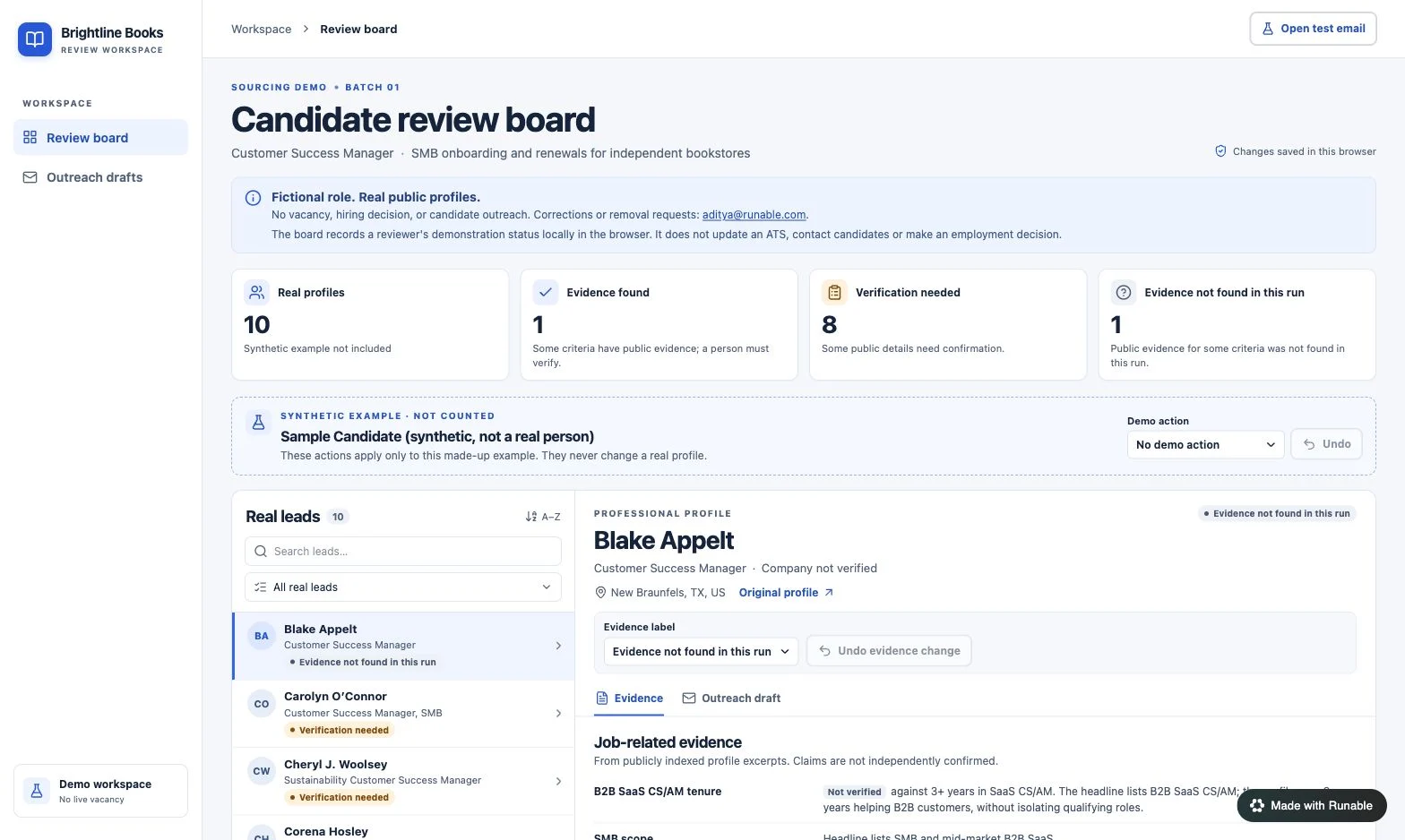
Each profile also has an editable sample outreach draft for internal review. The board's Open test email button opens a generic mailto draft addressed only to aditya@runable.com. It does not send email automatically or include any candidate's information.
Step 5: publishing the review board.
The review board is published at https://brightl-t9dod71.runable.site/. It carries the fictional-role disclosure and the correction contact.
Separate walkthrough of the published review board.
Step 6: the saved daily email schedule (one task shown).
The existing daily schedule was updated, not duplicated, for 9:00 AM Asia/Kolkata starting November 27. It emails a fixed 10-lead snapshot to aditya@runable.com only. It does not source new candidates daily, change statuses or send candidate outreach.
Step 7: the two received test emails.
Two emails were sent and opened in Aditya’s inbox: the complete candidate list marked manual test, and a separate TEST OUTREACH message stating that the role is fictional and no candidate was contacted. This verified manual email delivery, not automatic execution of the saved schedule, which remains unverified.
Download the sourcing workbook
Complete walkthrough
Complete walkthrough, about 3 minutes. Build waits are omitted.
Which AI tools help with candidate sourcing in 2026?
For sourcing specifically, the useful tools fall into three buckets: general AI agents, recruiting-specific platforms, and scheduling utilities. A short, honest rundown:
- Runable is particularly useful for small HR teams that want sourcing research, verification, and reviewable candidate artifacts in one workflow. Its Candidates sourcing workflow sources, verifies, and tracks candidates against your criteria, learns from reviewer feedback between manual re-runs, and exports a viewing copy to Google Sheets. Honest cons: it is a general-purpose agent, not a recruiting suite, so it has no built-in ATS, no candidate database of its own, and you still need your existing ATS for pipeline tracking. Pricing (as of November 2026): Free tier; Pro $20/mo, Max $100/mo.
- LinkedIn Recruiter remains the deepest candidate database but is expensive, and its pricing is not consistently public, so ask LinkedIn for a current quote. Review any AI ranking features before relying on them.
- Gem and Juicebox (PeopleGPT) are strong recruiting-specific sourcing tools with natural-language candidate search. Cons: priced for recruiting teams, overkill if you hire a few times a year.
- Ashby and Greenhouse are ATS platforms with AI assists; use them as the system of record that your sourcing layer feeds into, and audit any "AI match score" features before enabling them.
- Calendly or Cal.com handle the scheduling layer if you are not using an agent for it.
Pricing and features change often, so check each vendor's current pricing page before you buy.
What are the red flags that a tool is making decisions for you?
A tool is making hiring decisions when candidates can be rejected, ranked out, or deprioritized without a human reading their profile. Watch for these specific features:
- Auto-reject thresholds : "automatically decline candidates scoring below X." This is the textbook automated employment decision tool under NYC Local Law 144.
- Opaque fit scores : a single 0-100 number with no explanation of inputs. If you cannot explain the score to a rejected candidate or a regulator, do not sort by it.
- One-way video interview scoring : AI grading of recorded interviews (word choice, facial analysis) is among the most heavily scrutinized categories; Illinois regulates it explicitly.
- Knockout questions silently maintained by AI : knockouts are fine when a human wrote and reviews them, risky when a model updates them dynamically.
- No audit log : if the tool cannot show you who was filtered and why, you cannot run the bias audit that laws increasingly require.
A score is not automatically a problem. If a tool shows one, it should be labeled as criteria coverage, with the underlying evidence visible. None of this means avoiding AI in HR. It means choosing tools whose default output is information (lists, summaries, drafts, schedules) rather than outcomes (rankings, rejections, scores). If you are evaluating best AI agents for small business more broadly, the same information-versus-outcome test applies across every business function.
FAQ
What can AI help with in HR?
AI can research candidates, organize public information, summarize experience, draft outreach, and help schedule interviews. A person should still review the information and make every hiring decision.
Can AI decide whom to interview or hire?
It should not. AI can present evidence and highlight missing information, but a human should decide whom to contact, interview, advance, or hire.
What does Runable produce in this workflow?
Runable creates a reviewable candidate list with source links, evidence labels, unverified details, and outreach drafts. It gives the hiring team organized information, not a final recommendation.
Does Runable contact or reject candidates automatically?
Not in this demonstration. No candidate was contacted or rejected. The review-board statuses are controlled manually, and the outreach messages remain drafts until a person approves them.
Can a small business use this without an ATS?
Yes. A small team can begin with the review board and spreadsheet shown here. If the company already uses an ATS, it can remain the official system for tracking applications and hiring decisions.
Is it legal to use AI for candidate sourcing?
It can be, but the rules depend on the location, data, and way the output is used. Use relevant public information, verify what the AI finds, keep decisions human, and seek legal advice before using automated screening or ranking.
Related Reading
- Best AI Agents for Small Business in 2026 (By Category)
- AI Automation for Small Business: What to Automate First
- AI for Business in 2026: 12 Use Cases That Save Time and Money
- AI Employee: How Small Businesses Hire One in 2026
- AI Workflow Automation: 7 No-Code Workflows for 2026
Automate your candidate sourcing, not your hiring decisions: let Runable build the pipeline
Candidate sourcing is only one of the jobs Runable can handle. In the same workspace, teams can research markets, build websites and presentations, create marketing content and videos, prepare reports, and run recurring operational workflows. This gives small teams one place to manage connected work across hiring, marketing, research, and operations instead of switching between multiple tools.
Open the Candidates sourcing workflow, enter the role, location, and your must-have and optional criteria, and Runable researches and organizes candidates into an artifact you can review, with source links for the evidence it finds and unverified details clearly marked. The decisions stay exactly where they belong: with you. Start on the free tier and run your first sourcing workflow today.