AI Customer Service in 2026: What to Automate and What to Keep Human
Key Takeaways
- Automate lower-risk work: ticket routing, approved FAQs, order lookups, appointment confirmations, and first-response drafts.
- Keep judgment human: complaints, disputes, policy exceptions, sensitive conversations, and uncertain answers.
- Runable can build the full workflow: customer chat, grounded responses, escalation rules, human review, dashboards, and audit logs.
- Start with assistance, not replacement: measure response time, errors, and escalation rates before expanding automation.
- Never remove the human path: use approved sources, clear limits, visible handoffs, and reviewable logs.
At a Glance: What to Automate and What to Keep Human
AI customer service uses artificial intelligence to classify requests, retrieve approved information, draft responses and perform limited support actions. The safest systems automate predictable work while routing sensitive, uncertain or high-consequence decisions to a person.
| Support task | Approach | Why |
|---|---|---|
| Approved FAQs and policies | Automate with grounding | Lower risk when the source is current and approved |
| Order status and appointment confirmation | Automate after authentication | Primarily data retrieval |
| Ticket classification and routing | Automate | AI organizes the queue, humans keep decisions |
| Response drafting | AI-assisted | Human review for uncertain or sensitive cases |
| Routine, policy-defined refunds | Automate only if deliberately authorized | Needs limits and audit logs |
| Refund exceptions and billing disputes | Human decision | Financial and legal consequences |
| Complaints and angry customers | AI detects and summarizes; human responds | Emotion and trust need judgment |
| Standard cancellation requests | Allow self-service | Customers should not be trapped |
| Retention offers and disputed cancellations | Human | Context and discretion |
| Security, legal, medical, or financial matters | Human-led | High consequences of wrong answers |
What should a business automate first?
Start with work that is repetitive, easy to check, and low risk if it goes wrong. In practice that means five things: ticket classification, grounded FAQ answers, order-status lookups, appointment confirmations, and first-response drafting.
FAQ and policy answers are the obvious starting point. Questions like "what are your hours," "do you ship internationally," and "what is your return window" make up a large share of inbound volume. FAQ answers are lower risk when they are grounded in current, approved documentation, because the AI is quoting your policy instead of guessing. Zendesk's customer service statistics report that 51% of consumers prefer bots when they want immediate service. That is about quick, simple requests, not complaints or disputes. Source: Zendesk.
Order status and appointment confirmations come next. These are mostly data retrieval: the AI looks up a record and reports it. The key rule is authentication. Only share order details after the customer's identity matches the order, and if it does not match, hand the ticket to a person.
Ticket classification is the highest-leverage automation many small teams skip. An AI that reads every incoming message and tags it (billing, refund, technical issue, complaint, urgent) means your team opens a queue that is already sorted. McKinsey estimates that generative AI could create productivity value equivalent to approximately 30 to 45% of current customer operations costs. That is an estimate of potential, not a guaranteed cut, and your own results depend on your ticket mix and how well the workflow is designed. Source: McKinsey.
First-response drafting saves time on the replies people still send. The AI writes a draft from your approved sources, and a person approves, edits, or escalates it.
After-hours coverage works best through web chat, email intake, and collecting the details a person needs the next morning. Set a clear expectation, such as "a team member will follow up by 9am," for anything the AI cannot resolve. If you want to follow up by phone, Runable can place outbound AI calls, but it is not an inbound phone receptionist.
What customer service tasks should stay human?
Keep a person in charge wherever money, emotion, legal risk, or retention is at stake. That includes refund exceptions, billing disputes, complaints, disputed cancellations, security, legal, medical, or financial questions, and anything the AI flags as uncertain. This is not a permanent ban on automation. Some refunds and cancellations can be automated if you deliberately set limits, keep an audit log, and make a human path available.
Refund exceptions and billing disputes involve judgment with financial and sometimes legal consequences. An AI can draft a response, pull up the order, and summarize the case. A person should make the decision.
Complaints and angry customers need a person to respond. The useful automation is detection, not deflection: let the AI spot frustration in the first message, summarize the history, and move the ticket to the front of a human's queue. The stakes are real. Qualtrics XM Institute reported that 47% of bad customer experiences led consumers to reduce or stop spending. Source: Qualtrics.
Cancellations split in two. Standard cancellation requests should be easy to complete through self-service, because customers should not feel trapped. Retention offers and disputed cancellations are different, since they depend on context and discretion, so those stay with a person.
Unsupported promises are the legal risk to watch. In the 2024 case Moffatt v. Air Canada, a British Columbia tribunal held the airline responsible for inaccurate information its chatbot gave a customer. It shows why a bot should not promise anything your documents do not support. Legal obligations differ by jurisdiction, and there is no universal rule, so check what applies to you. Source: American Bar Association.
How do you split the work? A simple decision test
Run every support task through four questions:
- Can the answer come from a current, approved document or a record you can check?
- Is the downside of a wrong answer small?
- Can the customer reach a person at any point?
- Will you be able to review what the AI did afterward?
Four yeses means a task is a good candidate for automation. Any no means a person stays in the loop. Here is the same test as a rollout order:
- Start with classification and routing. This has relatively low customer-facing risk when the queue remains under human review, and you get labeled data about what people actually ask.
- Add grounded FAQ answers. Use the categories from step one to pick your most common questions, and write the approved answers yourself.
- Add order-status lookups and appointment confirmations, after authentication.
- Add reply drafting for routine cases, with a person approving each reply.
- Review, then expand. Look at the log, the error rate, and the escalation rate before you let the AI do anything more on its own.
There is no universal percentage of tickets that is safe to automate. Measure your own categories, error rates, and escalation needs instead of copying a benchmark from another company.
One drawback to plan for: AI drafts tend to drift toward generic politeness. Review a sample every week and update your documents, or your brand voice slowly turns into "We apologize for any inconvenience."
See it working: a support app built for a fictional company
To show this in practice, we gave the prompt below to Runable's agent, together with a policy document, an FAQ, 12 sample orders and 18 customer messages. It built a support app for Runable Homeware Demo, a fictional online homeware shop . Everything in the data is invented: the company, the customers, the orders, and the 18 messages. The classifications and draft replies come from a real AI model call per message, using only the documents we gave it. The agent also had a few extra setup instructions beyond the prompt: run it locally, do not pre-fill any reviewer history, double-check the model's escalation choices in code, and write down what it measured.
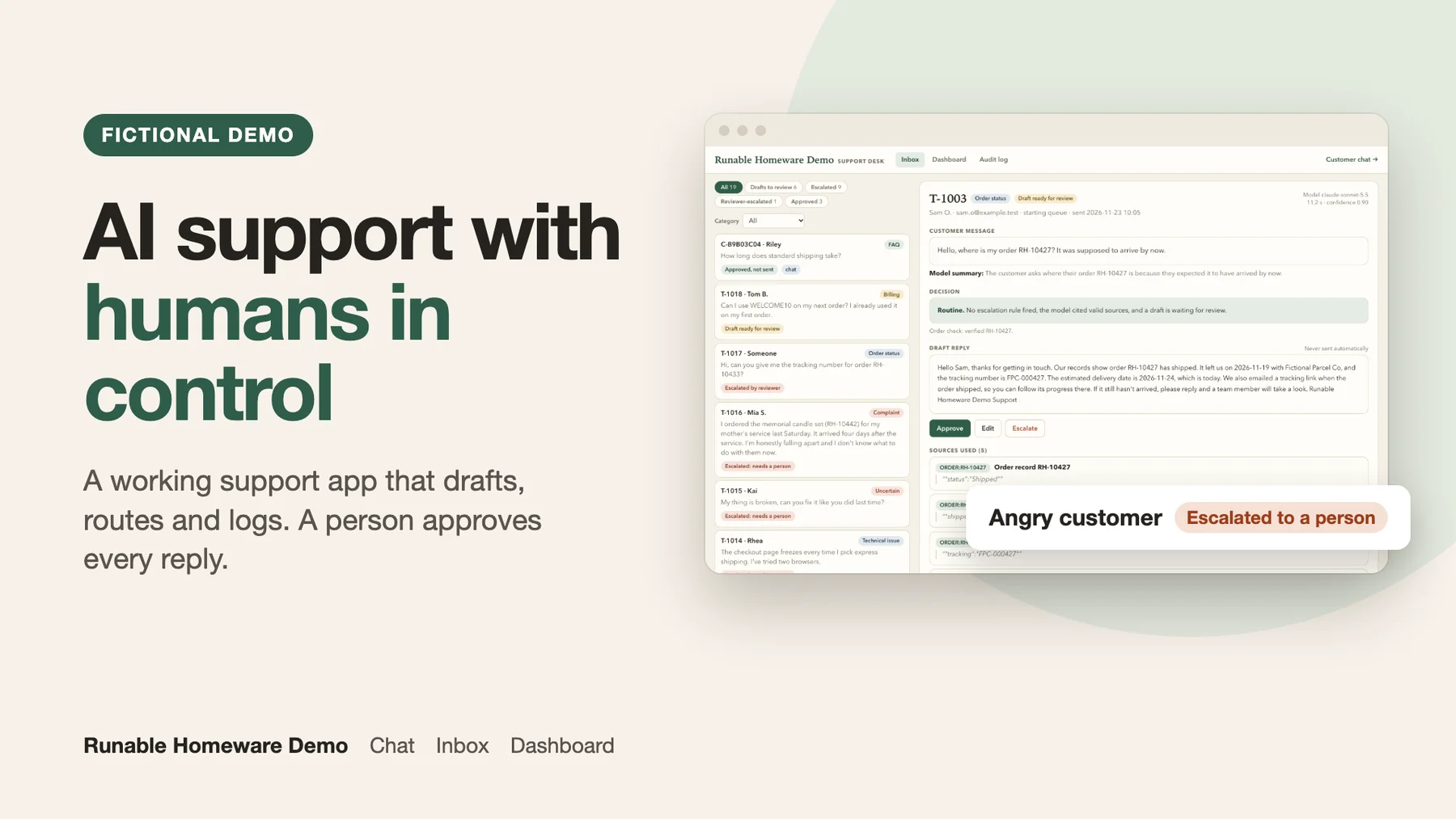
Runable Homeware Demo support app (fictional company)
Screen recording of the fictional Runable Homeware Demo support app, about two minutes: the app is built with Runable, a routine question gets a grounded draft that a person approves, a sensitive complaint is escalated automatically, and the dashboard and audit log show every action. Nothing is sent without human approval.
What went in: a support policy document (7 sections), a short FAQ (8 entries), 12 sample orders, and 18 fictional customer messages, from "can I use my welcome code twice?" to an angry third follow-up about a carafe set.
What happened across the 18 messages
| Measure | Result |
|---|---|
| Messages classified | 18 (3 FAQ, 3 order status, 3 billing, 3 refund, 2 complaint, 2 uncertain, 1 cancellation, 1 technical issue) |
| Drafts ready for a person to approve | 9 (3 FAQ, 3 order status, 1 refund, 1 cancellation, 1 billing) |
| Escalated to a person | 9 (2 refund, 2 billing, 2 complaint, 2 uncertain, 1 technical issue) |
| Escalations added by the code safeguard | 0. The model escalated all nine cases itself; the independent code rules also flagged eight of those nine. |
| Replies sent automatically | 0 |
| Model time per message | Median 5.5 seconds (range: 3.9 to 12.1) |
A few cases show the design working:
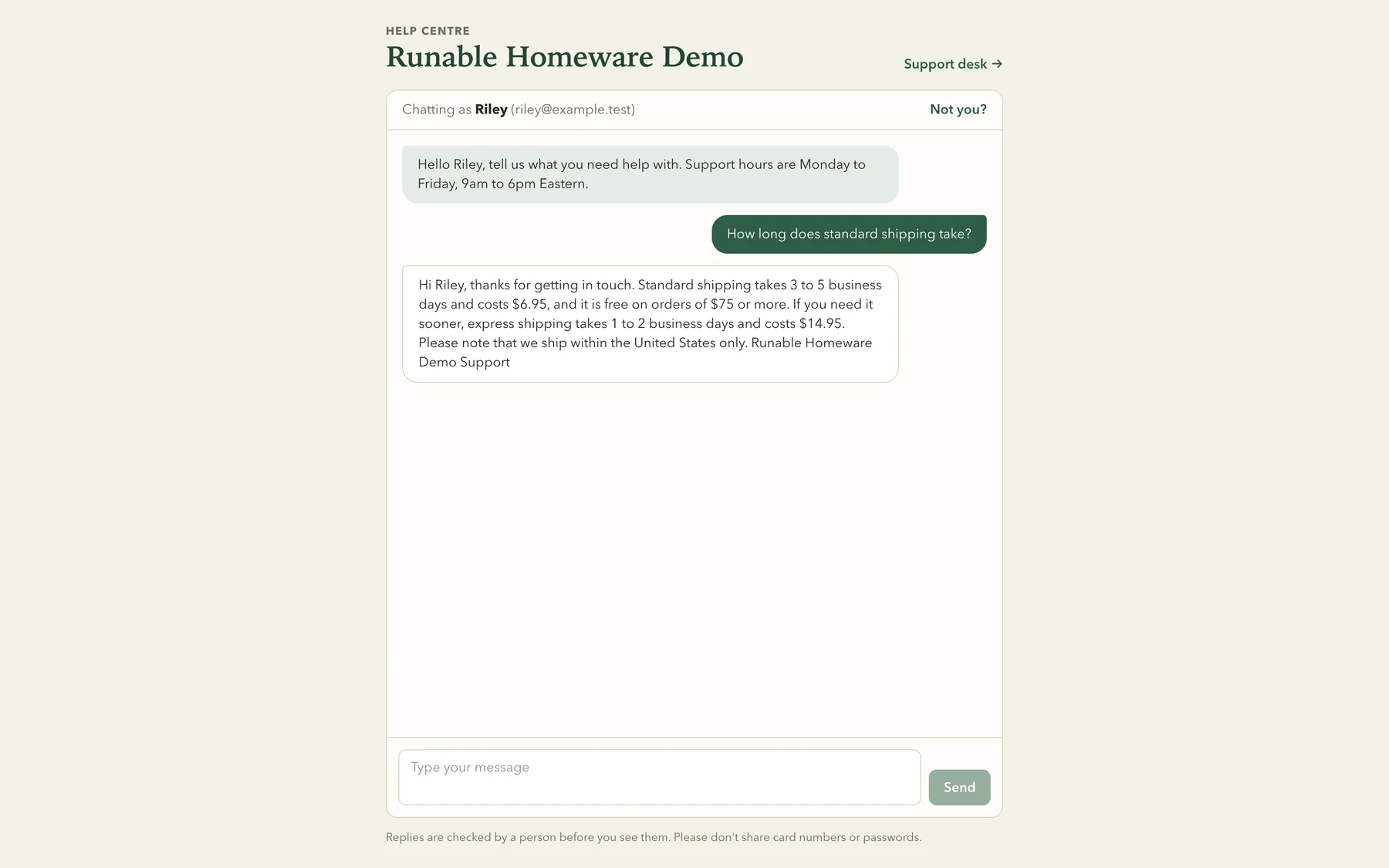
- A tracking request with no matching email. Someone asked for the tracking number of an order without giving an email that matched. The draft shared nothing about the order and asked for the order number and email instead.
- A bereavement message. A customer wrote about a memorial candle set that arrived four days after her mother's service. The assistant escalated it and drafted a short holding reply that promised nothing. That note said it was sorry about the loss of her mother, which the model inferred from "my mother's service," so a reviewer should still check wording like that before anything is sent.
- An angry third follow-up. The assistant escalated it, drafted a holding note that promised nothing, and the ticket page showed which model reasons and code rules sent it to a person.
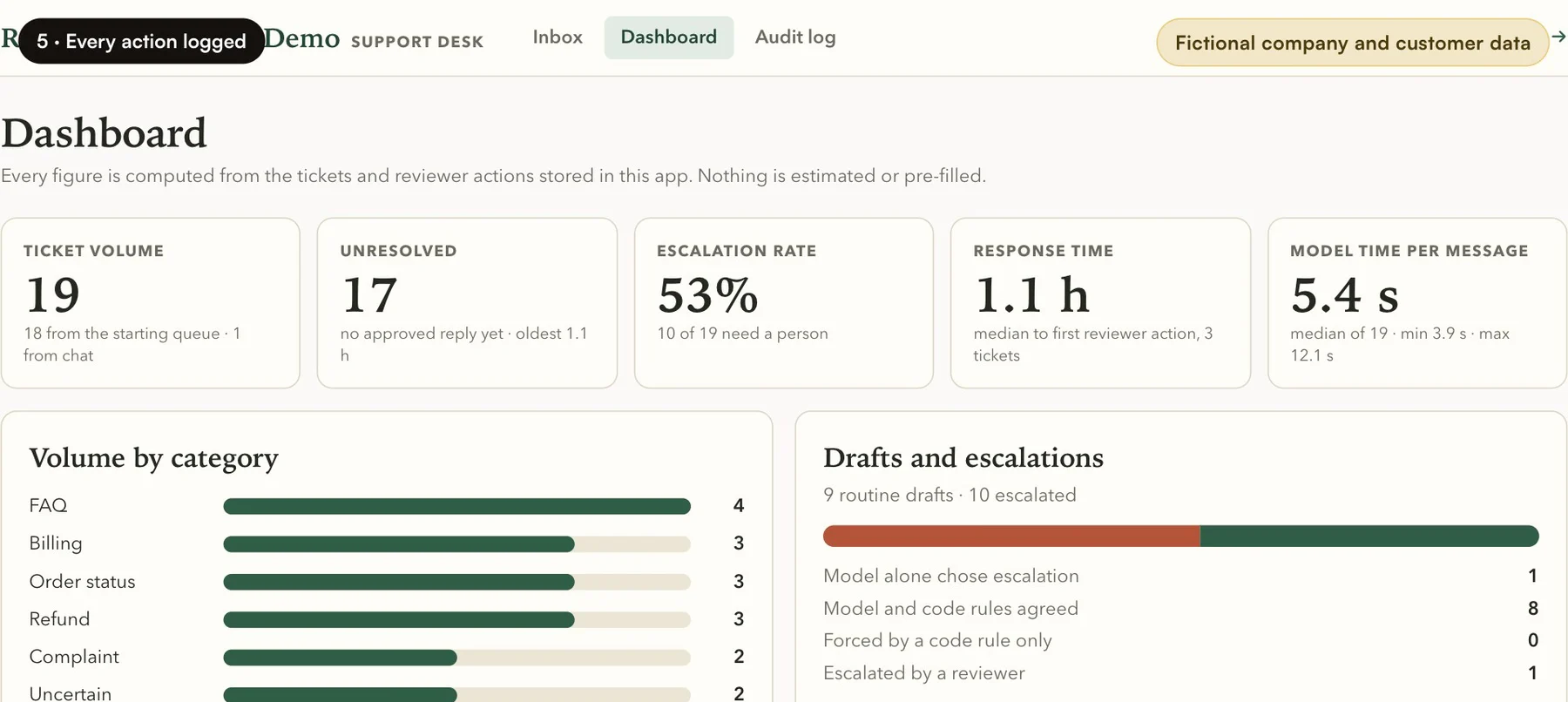
- Questions the documents did not cover. The dashboard lists the nine escalated tickets, including unsupported questions and sensitive cases that required human judgment. Reviewing them helps identify both documentation gaps and situations that should remain human-led.
What this does not show:
- It is a test of 18 invented messages, so it says nothing about accuracy on real customers.
- We ran the 18 messages twice, once before and once after renaming the shop, and all 18 decisions matched. That is a small sample, and model output can still vary between runs, which is one more reason a person reviews every reply.
- The dashboard in the recording adds the chat question to the 18-message starting queue and includes one reviewer escalation, so it shows 19 tickets and 10 escalations. Its reviewer figures—three tickets acted on and a median of 1.1 hours to first action—come entirely from the demo clicks and are not a performance benchmark.
- Customer satisfaction (CSAT) and deflection are not tracked. Every reply waits for a person, so nothing is auto-resolved.
- The rules that force escalation (complaints, billing disputes, refund exceptions, bereavement wording) are enforced in code as well as in the prompt. Because the model had already escalated every one of the 9 tickets, the sample alone does not prove that code layer. We tested it separately on made-up cases where the model "forgets" to escalate, and those are not counted above.
- When we first opened a ticket page, one display bug stopped tickets that cite the same source twice from loading. We reported it, and the Runable agent fixed it with a one-line change before the final run. Nothing else in the app was changed by hand.
Try the same build
Here is the exact prompt we used as the starting point. Replace the bracketed text with your own business and attach your own FAQ, policy document, and order data.
What does AI customer service cost?
Cost depends on your ticket volume, the channels you support, model usage, integrations, how much human review you need, and any helpdesk or phone services you run alongside the AI. Instead of a single price, compare the pricing models.
Dedicated support platforms often charge per resolution or per seat. For example, Intercom's Fin charges $0.99 per outcome. If you use it with Intercom's helpdesk, the helpdesk starts at $19 per seat per month; with another helpdesk, Fin is added to that platform's existing cost. Those models can fit teams that already run a full helpdesk.
General AI agent platforms price differently. Runable offers a Free plan, Pro at $20 per month, and Max at $100 per month. You build the support workflow plus the things around it (reports, templates, follow-up emails) in one workspace instead of paying for each function separately. Check Runable's pricing page for current details before you decide.
The honest trade-off: a general build layer will not match a dedicated helpdesk's reporting depth, such as agent performance views or long-running CSAT tracking. If you run a large support team, you may want both.
What are the risks of over-automating customer service?
The three real risks are invented policy, trapped customers, and slow brand erosion, and all three are preventable with good escalation design.
Invented policy means the AI confidently makes up a return window or a discount you never offered. Prevention: ground it strictly in your approved documents, and have it say "I'll connect you with the team" instead of guessing when a question falls outside them.
Trapped customers are the "let me speak to a human" doom loop. Prevention: a visible way to reach a person in every conversation, with no exceptions.
Silent brand erosion is slower. Every reply is technically correct and emotionally flat, and months later your reviews say "feels like talking to a machine." Prevention: keep your highest-emotion moments deliberately human, and audit transcripts regularly.
A useful principle: AI should make customers feel they got faster service, never cheaper service.
How does Runable fit in?
Runable acts as the build and workflow layer. You describe your support process in plain English, and Runable can build a working support app: a chat widget or inbox, a knowledge base, grounded answers from your approved documents, ticket routing, reply drafts and macros, and a dashboard for response time, deflection, and CSAT where you have that data. It can also analyze tickets, send scheduled reports, send emails from a verified domain, create playbooks, decks, or tutorial videos for your team, and place outbound AI calls. Large teams may still keep a dedicated helpdesk for deep reporting and agent management, and use Runable to build the layer around it.
FAQ
What customer service tasks should a business automate first?
Start with ticket classification and routing, then grounded FAQ answers, order-status lookups, appointment confirmations, and first-response drafts. Keep disputed refunds, complaints, policy exceptions, and emotionally sensitive conversations with a person.
Can AI fully replace human customer service agents in 2026?
Not safely. AI handles repetitive, lower-risk work well, but complaints, disputes, and exceptions need human judgment. The safe level of automation depends on your data quality, the cost of errors, and whether customers can always reach a person.
How do customers feel about AI customer service?
It depends on the task. Zendesk reports that 51% of consumers prefer bots when they want immediate service, but that is for quick requests, not complaints or disputes. Qualtrics XM Institute found that 47% of bad customer experiences led consumers to reduce or stop spending, so the handoff to a human matters.
How much does AI customer service software cost?
It depends on ticket volume, channels, model usage, integrations, human review, and any helpdesk or phone services you use. Runable has a Free plan, Pro at $20 per month, and Max at $100 per month. Intercom's Fin starts at $0.99 per outcome.
How do I stop an AI chatbot from giving wrong answers?
Answer only from approved documents, tell the AI not to invent policy, route uncertain questions to a person, and keep a log of every source used. Review the log regularly and correct the documents when you find gaps.
Related Reading
- AI for Small Business: 11 Best Tools in 2026
- AI Automation for Small Business: What to Automate First
- AI Workflow Automation: 7 No-Code Workflows for 2026
- Best AI Agents for Small Business in 2026 (By Category)
- AI for Business in 2026: 12 Use Cases That Save Time and Money
- How to Grow Your Business in 2026: 7-Step AI Playbook
Build a customer-support workflow that keeps humans in control
Describe your support process in plain English and use Runable to build a working support app with grounded answers, ticket triage, human escalation and a review dashboard. Add a help centre, response templates, scheduled reporting and outbound follow-ups in the same workspace.